

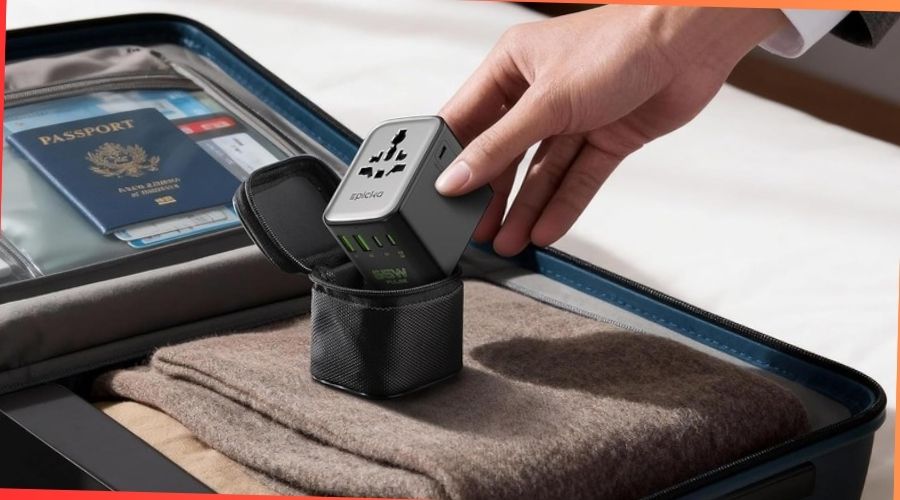
Buying a new gadget can be exciting, but it can also be confusing. You want to make sure you get the best value for your money.
Before you hit the buy button, there are important things you need to check. These simple steps can save you from headaches, wasted cash, and regret. Keep reading to discover what you must look for to make a smart and confident purchase.
Your next gadget could be exactly what you need—if you know what to watch out for.
Set Your Budget

Setting a budget is the first step before buying any gadget. It helps you avoid overspending and keeps your choices clear. A well-planned budget guides you to pick the right device that fits your needs and wallet. Think about what you want to spend and what you expect from the gadget. This way, you save time and money during shopping.
Determine Your Spending Limit
Start by deciding the highest amount you can pay. Consider your monthly income and other expenses. Set a firm limit and stick to it. This prevents impulse buying and buyer’s remorse. Write down your budget and keep it visible while shopping. This simple step helps you focus on options within your price range.
Consider Long-term Value
Think beyond the initial price. Look for gadgets that last longer and need fewer repairs. A cheap gadget may cost more over time. Check warranty details and customer service quality. Choose devices with good reviews and reliable brands. Spending a bit more now can save money later.
Research Product Features
Researching product features is a key step before buying any gadget. It helps you find the right product that fits your needs. Understanding features avoids surprises after purchase. It also helps you get the best value for your money.
Check each feature carefully. Know what you need and what each gadget offers. Focus on features that matter most to you. This makes your decision easier and smarter.
Compare Specifications
Compare the specs of different gadgets side by side. Look at the processor speed, memory, storage, and battery life. These details show how well the device works. Higher specs usually mean better performance, but they can cost more.
Check screen size and resolution for good display quality. Consider camera quality if photos are important. Also, note the weight and size for portability. Comparing specs helps you choose the best option within your budget.
Check Compatibility
Make sure the gadget works with your other devices. Check if it supports your phone, tablet, or computer. Look at the operating system and apps it uses. Some gadgets work only with certain brands or systems.
Also, check for needed ports and wireless options like Bluetooth or Wi-Fi. Compatibility ensures smooth use and saves you from extra costs. Confirming this before buying avoids future hassles.
Read Customer Reviews
Reading customer reviews is a smart step before buying any gadget. Reviews offer real insights from people who already use the product. They help you see both the good and the bad.
Reviews also show how well the gadget works over time. This helps you avoid surprises after purchase. Let’s explore two key points to check in customer reviews.
Identify Common Issues
Look for problems mentioned by many buyers. This shows if the gadget has frequent faults. Pay attention to issues like battery life, durability, or software bugs.
Repeated complaints mean the problem is likely real. This helps you decide if the issue is a deal-breaker. Avoid gadgets with serious or common flaws.
Evaluate Overall Satisfaction
Check how happy most users are with the product. High ratings usually mean good quality and performance. Low ratings can warn you about poor experience.
Read both positive and negative comments. This gives a balanced view of the gadget’s strengths and weaknesses. Choose products with more satisfied customers for better chances of success.
Assess Brand Reputation
Assessing the brand reputation is key before buying any gadget. A trusted brand often means better quality and service. It helps avoid problems later on. Knowing who makes the product can save money and time. Brand reputation gives clues about the gadget’s reliability and durability.
Look For Reliable Manufacturers
Choose brands known for making quality gadgets. Reliable manufacturers have a good track record. They use better parts and follow strict quality checks. Check user reviews and ratings for insight. Brands with many positive reviews usually offer safer choices. Avoid unknown or new brands with little feedback.
Check Warranty And Support
Warranty protects your purchase from defects or failures. Good brands offer clear and fair warranty terms. Look for at least one year of coverage. Also, check if the brand provides easy access to customer support. Fast and helpful service is important when problems arise. Brands with strong support reduce stress and extra costs.
Test The Gadget In-store

Testing the gadget in-store offers a real feel for the product. It helps you understand the quality and usability better. This hands-on experience can save you from future regrets. Trying before buying is a smart choice for any tech purchase.
Check Build Quality
Hold the gadget firmly in your hand. Feel its weight and texture. Look closely at its material and finish. Check if buttons and parts fit well. Notice any creaks or loose elements. A sturdy build means the gadget lasts longer.
Try User Interface
Turn on the gadget and explore its menus. See if the screen responds quickly to touch. Test the buttons for smooth operation. Make sure the layout is easy to understand. A simple interface reduces frustration. It makes daily use much easier.
Credit: www.refab.me
Consider Future-proofing
Buying a gadget is an important choice. You want it to last and work well for years. Future-proofing means picking a device that stays useful over time. It helps avoid quick replacements and saves money. Think about how the gadget will handle updates and upgrades. This is key to getting good value from your purchase.
Look For Software Updates
Check if the gadget gets regular software updates. Updates fix bugs and add new features. They keep the device secure and running smoothly. A gadget without updates may become slow or unsafe. Find out how long the manufacturer supports the device. Some brands offer updates for many years. This support helps your gadget stay current.
Evaluate Upgrade Options
See if you can upgrade the gadget’s parts later. Some devices let you add more memory or better batteries. Others allow software upgrades to improve performance. Upgrade options make your gadget last longer. They let you keep up with new technology. A device with no upgrade choices may become outdated fast.
Check Return And Exchange Policies
Checking the return and exchange policies before buying gadgets is very important. It helps avoid problems if the product does not work as expected. Knowing these policies can save time, money, and stress. Every store has different rules about returns and exchanges. Understanding these rules can help you make a better buying decision.
Understand The Terms
Read the return and exchange policies carefully. Check how many days you have to return the gadget. Some stores allow returns within 7 days, others up to 30 days. Look for conditions like whether the gadget must be unopened or unused. See if you need a receipt to get a refund or exchange. Know if the store offers full or partial refunds. Some places only give store credit. Being clear on these terms avoids surprises later.
Plan For Possible Issues
Think about what could go wrong with the gadget. It might arrive damaged or stop working soon after purchase. Check if the store covers shipping costs for returns. Find out if you must pay restocking fees. Know if exchanges are easy or need extra steps. Planning ahead helps you act fast if the gadget has problems. This way, you protect your money and get what you want.

Credit: www.rzewatches.com
Evaluate Battery Life
Battery life is a key factor when buying any gadget. It affects how long you can use the device without charging. A good battery life means less worry about running out of power during the day. Always check the battery details before making a purchase.
Check Manufacturer Claims
Start by reading the battery life claims from the maker. They usually list how many hours the device can last. Look for details on talk time, video playback, or standby time. These numbers come from tests done in labs. Real use might differ. Use these claims as a basic guide.
Read Real-world Usage Reports
Look for reviews and feedback from real users. They share their daily experiences with battery life. Check how long the battery lasts during typical tasks. See if users mention quick battery drain or charging issues. This info helps you understand the true battery performance. It’s a reliable way to avoid surprises.
Look For Deals And Discounts
Finding a good deal makes buying gadgets more affordable. Many stores offer discounts and special prices. These savings help you get better value for your money. Taking time to search for deals can lead to big savings. Focus on price comparisons and offers before purchasing.
Compare Prices Across Retailers
Check prices from different stores before buying. Prices can vary a lot for the same gadget. Use price comparison websites to save time. Some retailers offer special deals not found elsewhere. Checking multiple sites helps you find the best price available.
Use Coupons And Cashback Offers
Coupons reduce the total price at checkout. Look for online coupon codes before buying. Cashback offers give money back after purchase. Many credit cards and apps provide cashback rewards. Using coupons and cashback together lowers the cost even more.

Credit: www.injuredgadgets.com
Frequently Asked Questions
What Key Features Should I Check Before Buying Gadgets?
Check the gadget’s compatibility, battery life, and warranty. Look for user reviews and brand reliability. Ensure it meets your specific needs and budget.
How Important Is Gadget Warranty And Customer Support?
Warranty protects against defects and malfunctions. Good customer support helps resolve issues quickly. Always choose gadgets with reliable after-sales service.
Should I Consider Gadget Compatibility With Other Devices?
Yes, compatibility ensures seamless integration with your existing devices. Check operating systems, connectivity options, and accessory support before purchasing.
How Can I Verify The Authenticity Of A Gadget?
Buy from authorized sellers or official stores. Check for genuine packaging, serial numbers, and manufacturer details to avoid counterfeit products.
Conclusion
Choosing the right gadget takes careful thought and simple checks. Check the features you need most. Compare prices from different sellers. Read reviews to learn from others’ experiences. Consider the warranty and support options. Make sure the gadget fits your daily use.
Taking these steps helps avoid regrets later. Buy smart, and enjoy your new gadget with confidence.